How Bauplan Works With the Systems You Already Use


A lot of the value of an open lakehouse is hidden in a single property: the data is never trapped. The tables a Bauplan pipeline produces are not held in a proprietary Bauplan format. They are full Apache Iceberg tables, written to your own object storage, described by an open catalog that any Iceberg-aware engine can read.
That property cuts both ways: because everything Bauplan touches is standard Iceberg, you can bring data into Bauplan from the systems you already run, and you can serve Bauplan tables back out to those same systems, without moving or duplicating data in either direction. Iceberg is the common format, and it works the same way regardless of which warehouse or engine is on the other side.
This blog post is a high-level map of how it works in both directions: how Bauplan tables are served out to the systems you already use, and how data from those systems comes back in.
How This Works
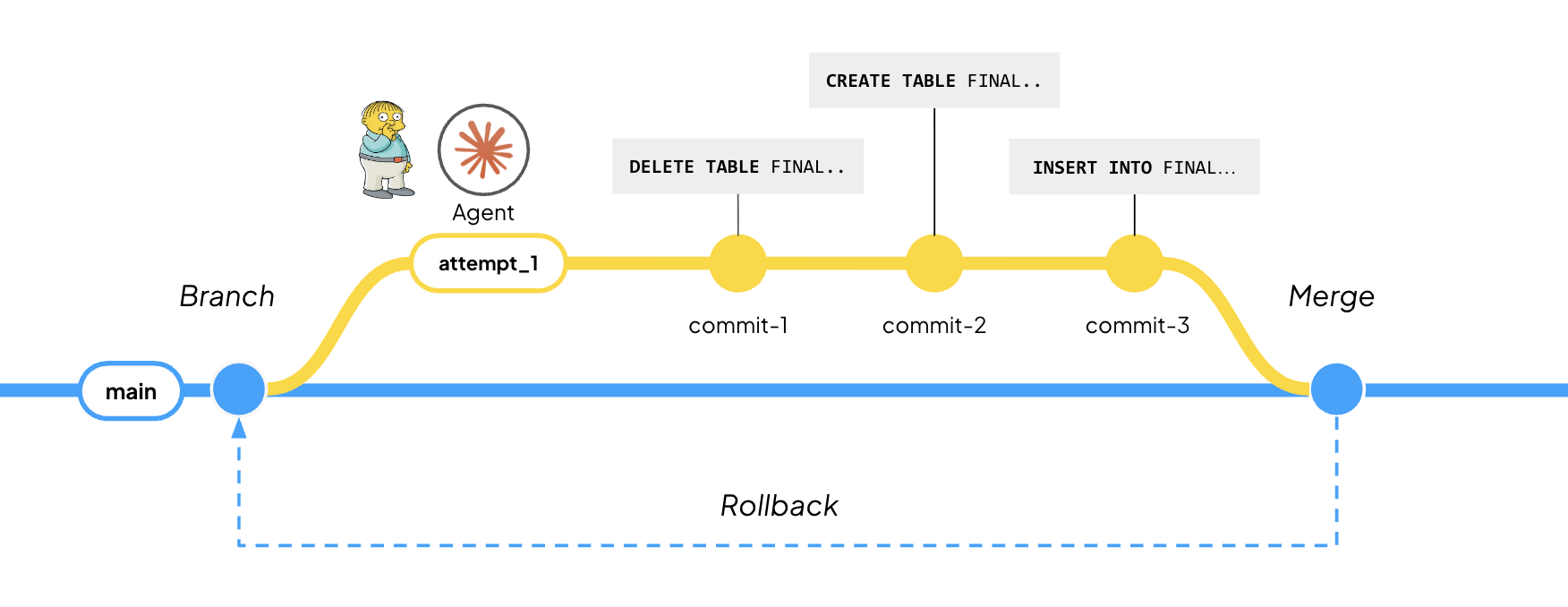
When Bauplan runs a pipeline, the output is a standard Iceberg table in a bucket in your own cloud account. The files are Parquet. The metadata that turns those files into a table, the schema, etc. follows the open Iceberg specification. Tables are versioned on branches, the same way code is in Git, so a table can be built and validated in isolation before it is merged and made available to downstream consumers.
Because the format is open, the table becomes part of a wider ecosystem the moment it is written. Any engine that accepts Iceberg snapshots can register such a table as an external table and read it where it already lives. The reverse holds too: Iceberg tables produced elsewhere, by another warehouse, an ingestion tool, or a CDC pipeline, can be registered into Bauplan and consumed as native tables.
So the question 'how do I integrate this with what I already have?' has a single, consistent answer in both directions: through Iceberg. The rest is implementation detail.
Getting Data Out
Take the most common case first. You have tables in Bauplan, and you want your existing serving layer to query them. Snowflake is the cleanest illustration.
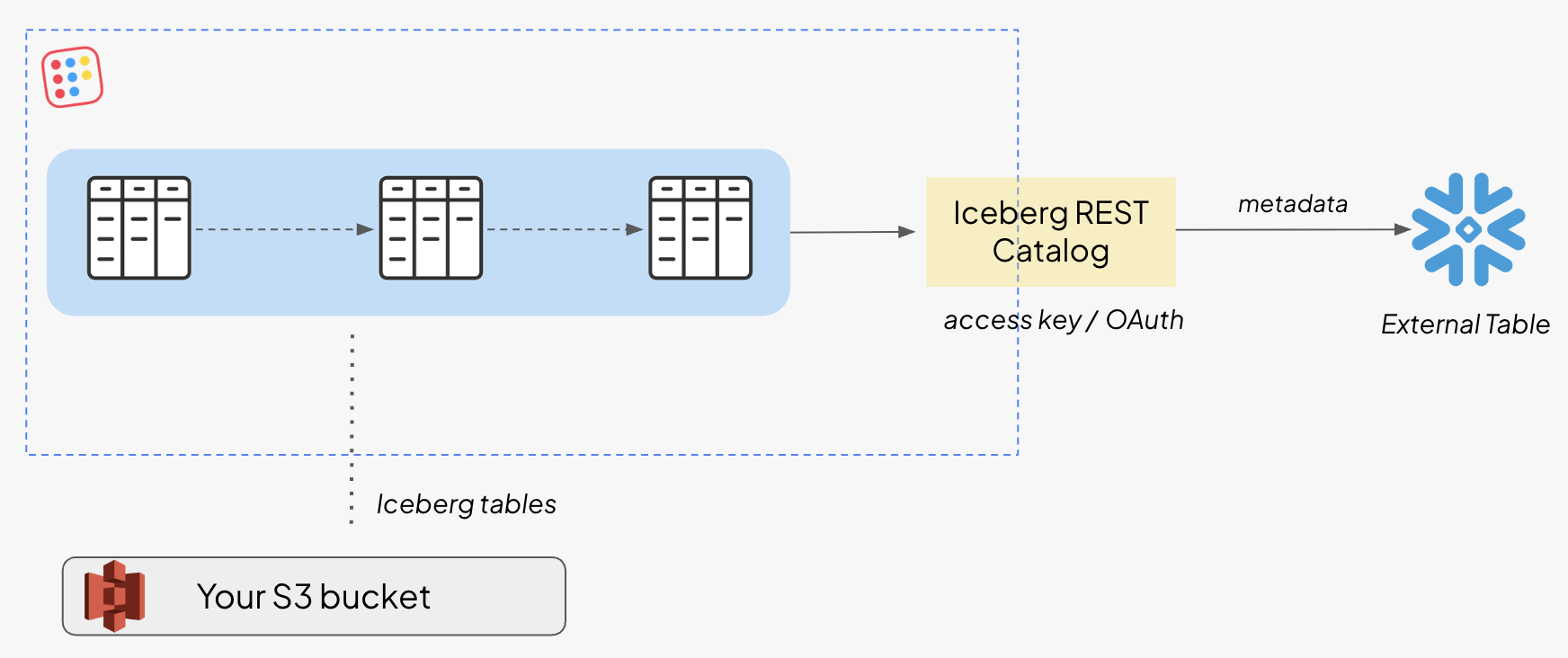
There are two ways to connect Snowflake to a Bauplan table, and one is meaningfully better. The first points Snowflake straight at the physical layer, the metadata file in object storage. It works, but it is static because it pins to a single snapshot. That reference does not follow the table as it keeps evolving in Bauplan, which is exactly what the catalog path solves.
The better path goes through the catalog. Bauplan exposes a public catalog endpoint that implements the standard Iceberg REST, so Snowflake connects through its native catalog integration using a Bauplan access key or OAuth token. Once a table is registered this way, Snowflake refreshes its metadata on its own as the table changes inside Bauplan. You register once and the serving layer stays current with whatever you ship upstream.
CREATE OR REPLACE CATALOG INTEGRATION BAUPLAN_CATALOG_MAIN
CATALOG_SOURCE     = ICEBERG_REST
TABLE_FORMAT       = ICEBERG
CATALOG_NAMESPACE  = 'bauplan'                -- optional default namespace
REST_CONFIG = (
CATALOG_URI      = 'https://api.use1.aprod.bauplanlabs.com/iceberg'
)
REST_AUTHENTICATION = (
TYPE             = BEARER
BEARER_TOKEN     = '<BAUPLAN_API_KEY>'
);
Two things are worth knowing here. First, the catalog is branch-aware: the base endpoint resolves to main, but naming a branch or tag after the path (/iceberg/your-branch) points Snowflake at that branch instead, so a table can be audited in isolation and queried for review before it is ever merged. Second, staying live depends on auto-refresh, which is off by default on the table and has to be enabled explicitly. Once enabled, changes in Bauplan propagate to Snowflake without anyone running a sync job.
From the analyst's side, none of this is visible. They run SELECT * FROM your_table and the Bauplan table behaves like any other table in Snowflake. The full setup, including the external volume and the table definition, is in the docs.
Getting Data In
Not all of your data starts in Bauplan. When it lives somewhere else, there are two distinct things you might want, and they call for different mechanisms.
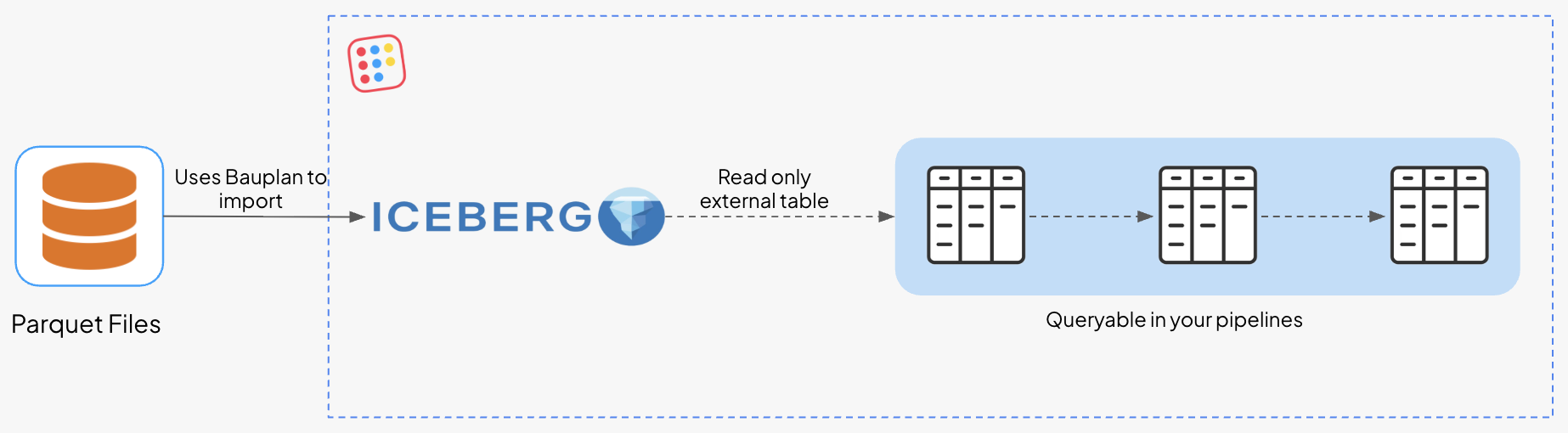
1. You want to query data that lives elsewhere. You do not have to move it. Register it as an external table, and Bauplan reads it where it sits, read-only, with no copy. An Iceberg table produced by another warehouse, or Parquet files sitting in another bucket, becomes queryable inside your Bauplan pipelines without duplicating a single file.
2. You want the data to live in Bauplan. This is not querying in place; it is writing into the lakehouse, and the branch model applies on the way in exactly as it does on the way out. You can write to a specific branch and namespace, so incoming data lands in isolation and is merged into main only when it is ready, instead of going straight into your production tables.
This is the pattern we built for Trust & Will, using Estuary on the way in and Snowflake on the way out. Estuary streams from a source like Postgres and merges changes into Bauplan Iceberg tables in near real time, with full CDC, so inserts, updates, and deletes are all reflected in the table. You point it at a branch (writes go to main by default, or to /iceberg/your-branch) and at a target namespace, and the stream materializes as native Bauplan tables your pipelines can build on. Those same tables are then served back out to their Snowflake users, so data comes in through one open integration and goes out through another, with a single governed copy in between. See here for the complete walkthrough.
Why This Beats a Migration
When data exists once, in open storage, and the systems your teams already use can read it in place, you stop paying for the same data twice, you stop maintaining pipelines whose only job is to shuttle copies between tools, and you stop having the meeting where two teams arrive with two different numbers because their copies drifted. The data is built and governed in Bauplan and consumed wherever it needs to be consumed, with no duplication and no extra load on the people consuming it.
Snowflake is the example throughout this post because it is the most common serving layer, but the capability is general. Because Bauplan speaks open Iceberg, the same logic applies to anything else that speaks it. You integrate with the stack you have, in both directions, through one format.
The integration docs, including the full Snowflake configuration are available here!