Introducing Bauplan Skills: Safe automation for AI on your data



AI coding assistants now sit inside most serious engineering teams. They can write perfect code and analyze complex datasets in a heartbeat, they can loop over codebases over and over, handle reviews and PR processes to converge to production.
But surely we felt the same way: every time we are about to hit speed of light velocity with our coding agents, we have to slow down cause we don’t want to do something we may regret with the data.
The main gap that we still have appears to be when this code needs to manipulate data.
Data is a bottleneck in the Claude Code era because
- Unlike code, it is not local. Data is in shared locations and downstream systems (dashboards, ML models, applications) depend on it.
- Unlike code, data does not have Git. We can’t easily branch, commit, merge and rollback production data.
- Cloud infrastructure for data is fragmented and UI-heavy. Critical steps sit in web consoles, hosted notebooks, and custom systems instead of APIs and IDE code.
The combination of these three things makes it pretty hard to have AI coding agents work with actual data.
Whether you are managing a data team, thinking about automation across the data lifecycle or you are a humble data engineer who just wants to use agents to help, you are missing one thing: a simple way to let agents act on real data.
Luckily, that is what we are building. Bauplan gives AI-generated changes a branch-first, transactional execution layer over your data: data branches, Git-style commits, and atomic publishes for every run.
In the rest of this post, we use those primitives with Bauplan Skills. Skills are simple markdown files that turn the work of a data team into small, reusable workflows that AI can execute end to end, safely, from the codebase.
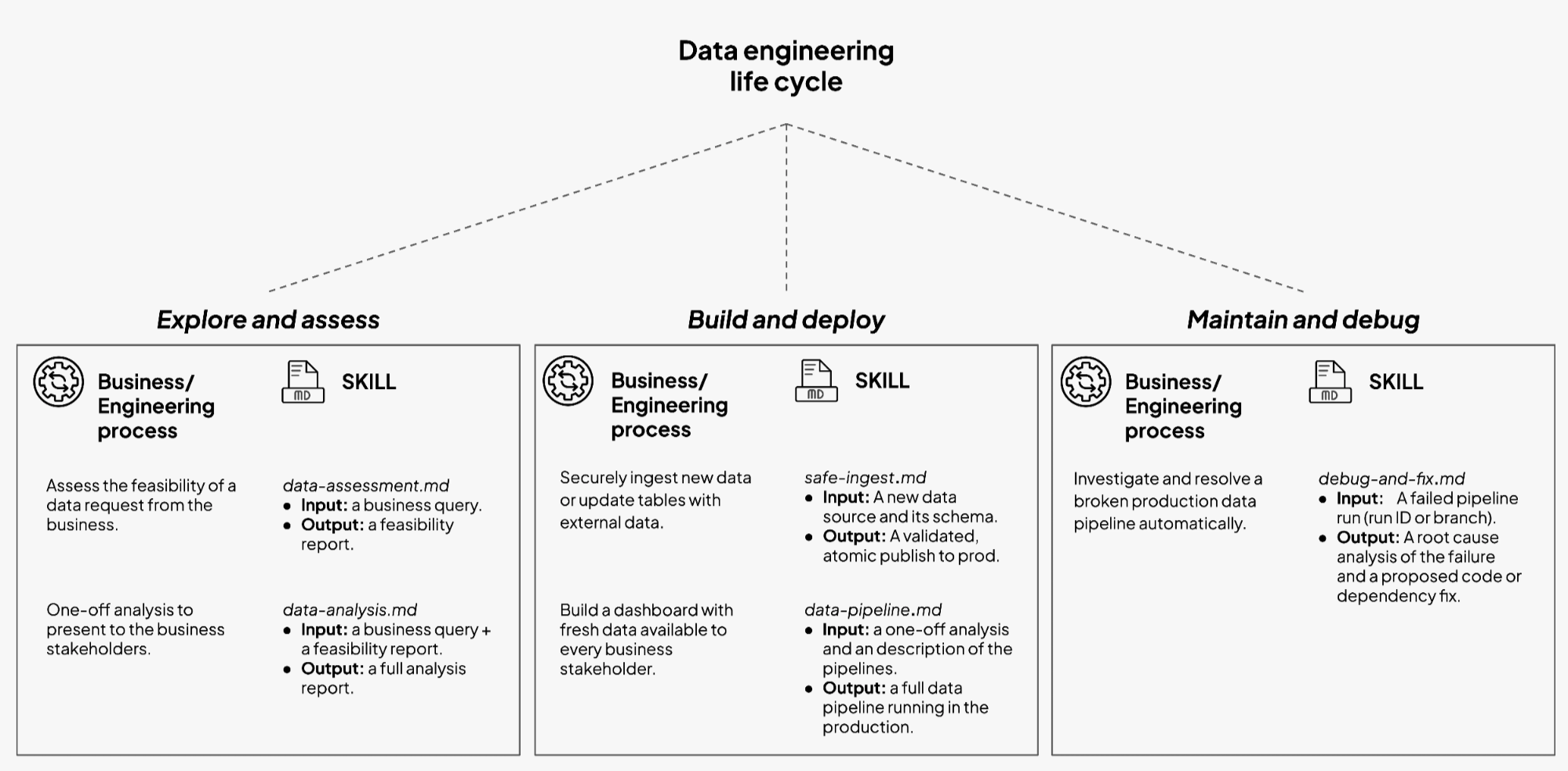
The life-cycle of a data request
A typical data request does not start with “write a multi-source optimized pipeline with autoscaling and one hundred data quality tests wired to PagerDuty.” It usually starts with a Slack message.
A product manager wants a new adoption metric. Finance wants a weekly cash-flow view. Operations wants better monitoring on a new integration. The request then travels through a sequence of steps that feel familiar across teams:
- Feasibility (can we even do it?)
An engineer checks whether the data exists, whether it joins cleanly, whether it is fresh enough, and whether there are obvious quality issues. - Exploratory analysis (ok we can do it, but is it worth doing?)
Someone runs ad hoc SQL or Python to answer the question once. They slice cohorts, check edge cases, and massage definitions until stakeholders agree on the logic. - Pipeline design and implementation (It is totally worth it, we should put it on a schedule).
The logic becomes a repeatable workflow. The team chooses inputs, outputs, schedules, expectations, and resource patterns. They add tests. They fit the pipeline into existing layers. - Steady state and maintenance (we depend on this pipeline now, take good care of it).
Metrics drift, schemas change, upstream systems fail. Engineers inspect runs, track lineage, and fix code or data issues while business users expect continuity.
In a reasonably large company, this sequence is MONTHS of work. Each step belongs to a slightly different conversation, with a different mix of business and engineering details, a lot of alignment calls and open tickets and so on.
So, the question is very simple: can we automate the heck out of it?
Automate the data chain
In short, yes. To get there, we need a few genuinely new ingredients. From here on, we will talk concretely about Bauplan. The abstractions behind branch-first execution and multi-step transactional execution cannot be found anywhere else today, so real examples have to be Bauplan examples. Also, this is our company blog after all.
Bauplan’s safety model in one loop
Bauplan gives data teams a simple execution loop that matches how software engineers already work. We use this loop for both humans and agents.
- Branch.
Work begins on a data branch. A data branch is an isolated view of your tables: a consistent snapshot of the lake with its own commit history, just like a feature branch in Git. New tables and versions appear here first. - Write code and run it.
Pipelines are Python and SQL functions. Your agent writes code in the IDE and runs it against Bauplan’s cloud execution environment. Runs target the dev branch, reading and writing Iceberg tables in that contained context. Turnaround is crazy fast, so your agent can iterate. - Verify.
Everything about the run is code or structured output. Models, expectations, configs, data commits, and logs all live in a place that Claude can read. The agent can write expectation tests and data quality checks that encode what “good” looks like for the new tables. - Merge.
Once checks pass and humans are comfortable, the branch merges into main. Bauplan treats this as a transactional publish. New tables and views appear together as a coherent version, or production stays unchanged. - Rollback.
Every run creates a commit in a Git-for-Data log. Teams can time travel, revert to a previous point, or branch again from any historical state.
This loop applies to ingestion, analytics, and repair. It gives each workflow a stable frame. There is always a branch, a set of functions, a run, and a merge decision.
The surface area that agents see stays small: branch, run, query, inspect, commit, merge. The heavy lifting happens inside Bauplan’s infrastructure.
Introducing Skills
Bauplan Skills take this loop as given and build structured workflows on top.
In the Claude ecosystem, Skills are reusable, filesystem-based resources that provide domain-specific workflows, context, and best practices.
Bauplan Skills adopt this model for data engineering.
Each Skill is a directory that lives in the codebase next to your project:
- A
SKILL.mdfile describes the workflow: purpose, inputs, outputs, recommended sequence of actions, and safety constraints. - Optional templates give the assistant starting points for SQL, Python, expectations, or configuration files.
- Optional scripts implement common routines that Claude can invoke directly, such as a standard write-audit-publish ingestion loop.
When Claude Code starts inside the repo, it discovers these Skills. It loads the descriptions into its context when relevant. It then uses the Skill as a playbook for how to interact with Bauplan.
From the engineer’s point of view, a Skill is a small, documented unit of work. It maps a business process to a technical workflow that always runs through Bauplan’s branch-first execution model.
From the Head of Data’s point of view, a Skill is a standard. It captures a way of working that can be reused across projects and people, with clear boundaries and expectations.
Five Skills that match how teams already work
The first set of Bauplan Skills focuses on common flows that appear in most teams. Each one covers a specific stage in the lifecycle and expresses it in the branch–run–verify–merge loop.
1. Data assessment and exploration
The data-assessment and explore-data Skills help the team respond to a stakeholder question by assessing available data and effort. Claude scans the Bauplan catalog, inspects schemas and sample rows on a branch, checks freshness and coverage, and flags obvious gaps or risks. The result is a short feasibility note plus concrete queries or commands that live in the repo or a ticket.
2. Safe ingestion and backfills
The safe-ingestion Skill brings new or changing sources into the lake through a guarded write–audit–publish flow. Claude creates an import branch, loads data from S3 into staging, materializes Iceberg tables, and attaches Bauplan data quality checks. It runs the checks and only merges when they pass, leaving a debuggable branch with logs and diffs when they do not.
3. Pipeline creation
The data-pipeline Skill turns a proven analysis into a production pipeline with the right branches, models, tests, and schedules. Claude creates a dedicated data branch, generates models and expectations in the standard Bauplan layout, applies naming conventions, and runs the pipeline on that branch. When expectations hold, the Skill prepares the merge so the engineer can publish with one decision.
4. Data quality checks
The data-quality-checks Skill defines what “good data” means for key tables and encodes that as expectations. Claude proposes concrete checks for important columns and tables, then expresses them as Bauplan expectations wired into runs. Every pipeline or ingestion flow carries its own validation, and every run evaluates data against the rules the team sets.
5. Debug and repair
The debug-and-fix-pipeline Skill guides the path from a failed run or broken metric to a safe fix on a branch. Claude locates the failing job and affected tables, creates a debug branch from the right commit, reproduces the run, and inspects logs and diffs to isolate the issue. It proposes code or config changes, reruns with expectations, and leaves a ready-to-merge branch once the fix holds.
A Walkthrough from Request to Pipeline
Imagine a team that runs Bauplan and uses Claude Code in the main repository. The scenario:
“We want a weekly view of churn risk by segment for self-serve customers.”
A senior data engineer opens the repo, starts a session with Claude and writes:
“Do an assessment on the data in our data lake. We want to determine whether we can build a weekly churn-risk view for self-serve customers.”
Claude reads the data-assessment Skill, inspects the catalog through the MCP server, and replies with a short report: relevant tables, rough coverage, obvious issues around historical completeness, and a suggestion for a first-pass definition. The engineer edits the report and sends it back.
Next, the engineer asks:
“Produce a first analysis based on this definition. Create a data branch, commit the queries and provide a short narrative.”
Claude reads the explore-data Skill, creates a branch in Bauplan, generates SQL in a script in a local folder, runs it on the branch, and writes a markdown summary. The engineer inspects the queries and results, adjusts the narrative, and shares it with the business.
Once the team agrees on the metric and its behavior, the engineer requests:
“Build a pipeline that runs daily.
Claude scaffolds a new pipeline with models with the data-pipeline Skill . It wires a Bauplan run command and executes it on the branch. The pipeline runs correctly. The engineer scans the outputs and moves onto robustness.
“Now read the pipeline and the final artifact we are producing. Generate data quality and expectations tests that check for the most important columns and values.
Claude reads the data-quality-checks Skill, adds expectations for row counts, uniqueness on an uid column, and a simple anomaly detection on the churn rate.
The same pattern applies to a new S3 drop with the safe-ingestion Skill or to a broken run with the debug-and-fix Skill. At the end of this process, the new pipeline and the data produced by it are finally merged.
The important part is not the individual prompts. The important part is the shape of the work. Requests move as before: feasibility, analysis, pipeline, ingestion, repair. Skills give Claude a formal way to participate in each stage over an execution layer designed for this purpose.
What This Changes for Teams
For data teams, Skills increase leverage on three fronts:
- Throughput. More requests move through the lifecycle because common steps become cheaper. Feasibility, containerization of analysis logic, and standard ingestion patterns take fewer engineer hours.
- Reliability. Every Skill runs inside the branch-run-verify-merge loop. Failures create more information rather than more damage. Rollbacks and audits become simpler.
- Standardization. Once a team agrees on how to assess feasibility, build a pipeline, or ingest a source, that knowledge lives as a Skill, not only as tribal memory.
The result is not a “hands-off” data platform, but rather a clear division of labor: agents handle many of the mechanical steps across workflows, while people decide which Skills to apply, review outputs, and think more about the system as a whole.
Skills in general are still pretty early. The most useful answers will come from the teams who run them on real workloads. Three questions guide the work ahead:
- Where to draw boundaries between Skills.
Some teams we work with think of one Skill to own the full path from request to pipeline. Our enterprise customers, with more complexity, see the benefit of smaller Skills focused on feasibility, ingestion, or repair. - How to balance templates and generated code.
Ingestion and backfills often fit well in reusable scripts, while analysis and repair benefit from more ad hoc generation on top of a shared pattern. - What should become shared standards.
Certain flows will stay company specific, others can evolve into common recipes for ingestion, debugging, and repair that Bauplan can host and version beside your code.
The current library covers the workflows we see most often and leaves room to grow with your feedback.
To try the Skills today, start from our documentation for AI assistants in the docs and download the actual skills.